What Is an Instagram Name Style?
An Instagram name style is a version of your name written with special Unicode letters, symbols and emojis so it looks different from plain text. Instead of a normal "Sara", you can show something like a bold, cursive, bubble or heart-decorated version of it. These styles are not real fonts that you install. They are characters that already exist on your phone, which is why you can copy them from this page and paste them straight into Instagram.
People use a name style to make a profile look more personal and easier to remember. A creator can match the style to a theme, a business can add a small symbol to stand out in comments, and a regular user can simply make their Instagram name look fresh. Our generator builds dozens of styles from whatever you type, so you can compare them side by side and choose the one you like. Whether you want a simple Instagram stylish name or a bold, decorated one, you will find it here.
How to Use the Instagram Name Style Generator
You do not need an account, an app or any special skills. The whole process takes less than a minute, and the screenshots below show each step on the real page.
Step 1: Open the Generator
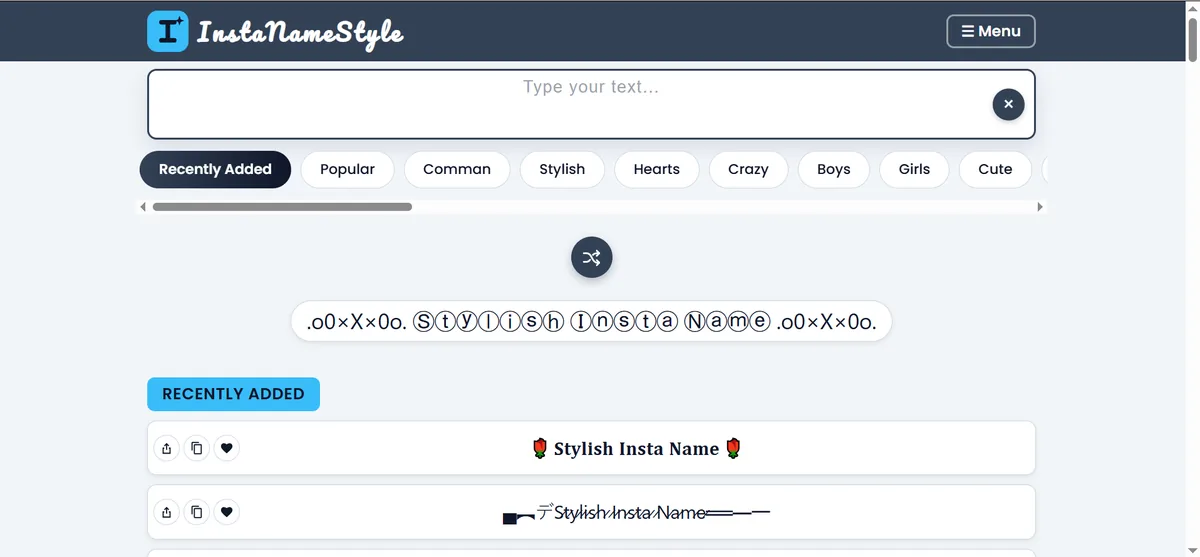
Scroll to the top of this page. You will see a text box that says "Type your text…", a row of category buttons such as Recently Added, Popular, Common, Stylish, Hearts, Crazy, Boys, Girls and Cute, and a shuffle button that creates random stylish name ideas. Even before you type anything, the page already shows a ready-made list of styles.
Step 2: Type Your Name or Username
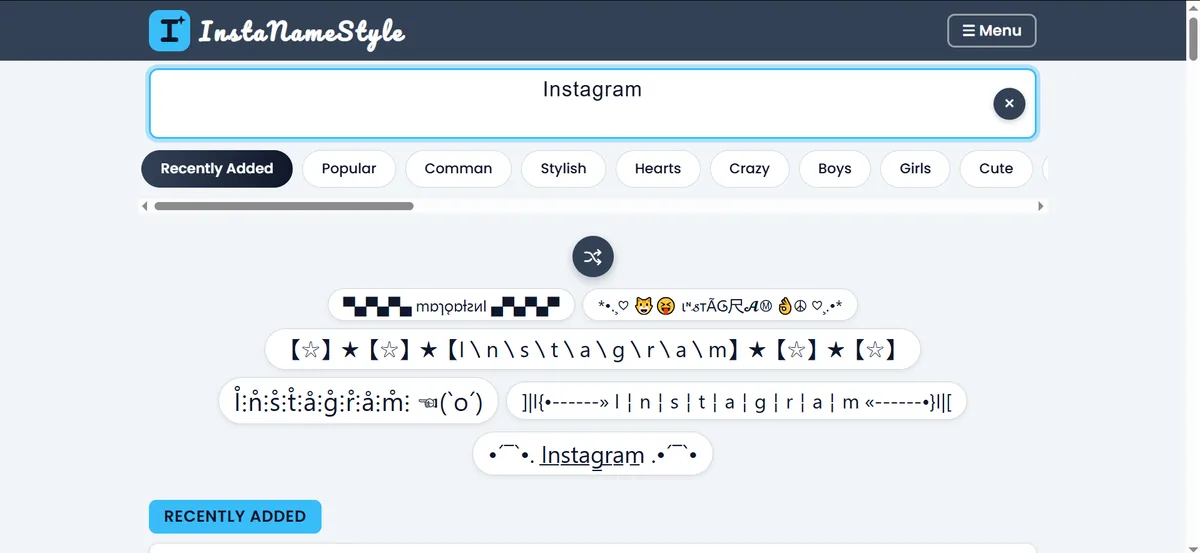
Click the text box and type the name you want to style. It can be your first name, a nickname, your brand name or any short text, up to 40 characters. As you type, every Instagram name style on the page updates instantly, so you can see exactly how your own name will look in each design. If you want to start over, the round × button on the right clears the box.
Step 3: Browse and Choose a Style
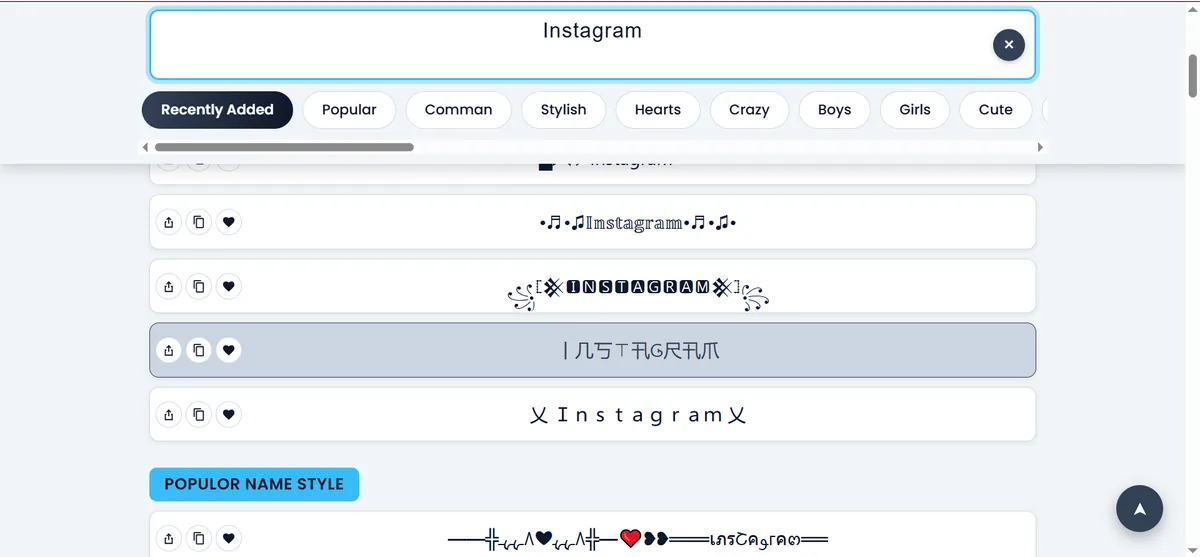
Scroll through the sections. Recently Added shows our newest designs, Popular shows the styles people copy most, and the other sections group names by look and mood. Every row has three small buttons: share, copy and favourite. Tap the heart on the styles you love so you can come back to them, or switch categories to try something different, such as a name font style that looks like cursive handwriting or a simple clean design.
Step 4: Copy and Paste It into Instagram
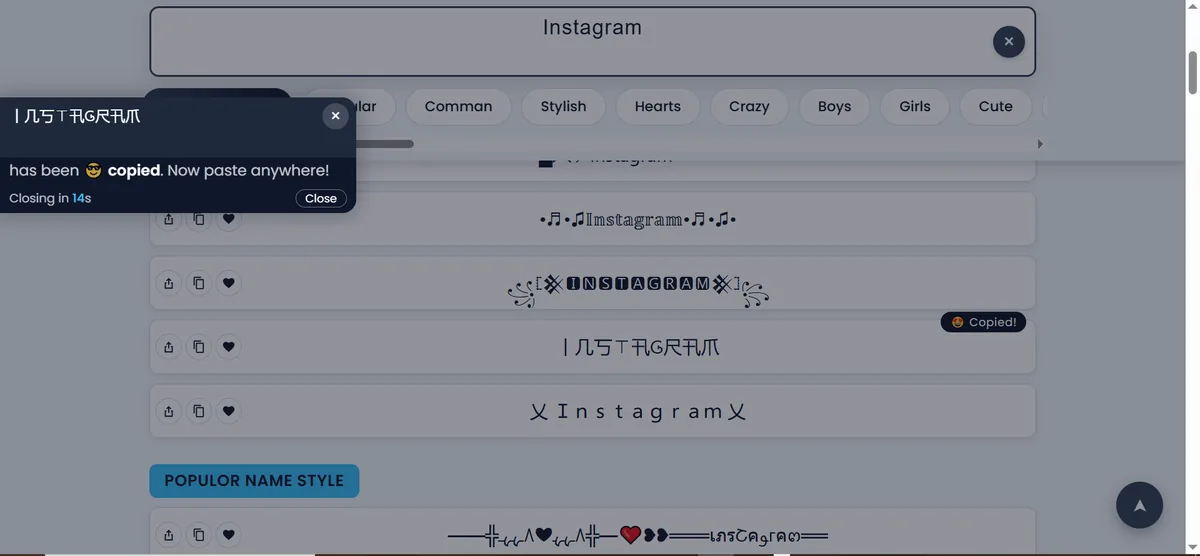
Tap any style, or press its copy button. A small message confirms that the text has been copied, and you can paste it anywhere. This is the quick name style copy paste flow that most visitors use. Open Instagram, go to Edit Profile, long-press in the Name or Bio field, choose Paste, and save.
Types of Instagram Name Style You Can Create
Different accounts need different looks, so we organised the styles into groups. Each group also has its own page with many more designs.
Instagram Stylish Name Styles
If you want an Instagram stylish name that looks polished without being hard to read, start with the Stylish section on this page. These designs mix clean letters with small decorations such as stars, crowns and dividers. For a larger collection, visit our fancy name generator.
Instagram Name Style for Boys
Many boys and male creators prefer a strong, minimal look: bold letters, sharp symbols, dark or simple decorations. Our Instagram name style for boys page collects these designs, and the attitude name styles are popular for a confident, serious tone.
Instagram Stylish Name for Girls
For an Instagram stylish name for girls, people often choose soft cursive letters with hearts, flowers, butterflies and sparkles. Browse the Instagram name style for girls page, or try cute name styles and cursive name styles for a gentler feel.
Heart, Star, Bubble and Crazy Styles
Want something more playful? Try heart decorated names, star decorated names, bubble letters or the Crazy section on this page, which mixes many characters into one eye-catching result. You can also press the shuffle button to let the generator surprise you.
Where Can You Use Your Instagram Name Style?
A style you copy here works in most places that accept normal text:
- Instagram Name field: the display name shown under your profile picture.
- Instagram bio: a stylish heading, divider lines or highlighted words.
- Captions and comments: to make one word or a short phrase stand out.
- Story text and highlights: for titles and labels.
- Other apps: WhatsApp, Facebook, TikTok, Snapchat and game profiles.
Important: your Instagram username (the @handle) only allows plain letters, numbers, periods and underscores. Fancy characters will not be accepted there. Use your generated name style in the Name field and bio, and keep a simple, readable username.
Tips for Choosing the Best Instagram Name
A good Instagram name is easy to read, easy to remember and matches the kind of content you post. These tips help you choose well:
- Keep it readable. If you have to look twice to understand the name, try a simpler style.
- Do not overload it. One or two small symbols look better than ten.
- Match your theme. Soft cursive suits lifestyle and beauty pages, while bold or minimal styles suit fitness, gaming and business accounts.
- Use the same style everywhere. A consistent look across your name, bio and highlights feels professional.
- Check it on your phone. Always preview the name after pasting, because some styles look different on different devices.
- Keep your real name searchable. A heavily decorated name can be harder for people to find in search, so consider keeping your plain name or brand in your username.
Why a Good Name Style Matters on Instagram
Your name is one of the first things people notice on your profile, in comments and in search results. A clear, attractive name style or Instagram stylish name helps people recognise you faster and gives your page a more finished look. It costs nothing, takes seconds to change, and you can switch to another design whenever your taste or your brand changes.
That said, style should support your identity, not hide it. The best profiles combine a readable name, a short and clear bio, a good profile photo and consistent posts. A creative name style is a small finishing touch on top of those basics.
Instagram Name Style Not Showing Properly?
Because these styles use Unicode characters, a few older phones or apps may not have every symbol. If you see empty boxes or question marks, try the following:
- Choose a different style from the same category. Simple letter styles work on almost every device.
- Update your phone's system software and the Instagram app.
- Avoid styles with many rare symbols if most of your audience uses older devices.
- Paste the style into a note or message first to see how it looks before saving it to your profile.
Frequently Asked Questions
Is this Instagram name style generator free?
Yes. You can generate, copy and paste as many styles as you like without paying or signing up.
Can I use these styles in my Instagram username?
No. Instagram usernames accept only letters, numbers, periods and underscores. Use fancy styles in your display Name field and in your bio instead.
What is the difference between a name style and a font?
A font is a file that changes how normal letters look. A name style is made of different characters that already exist in Unicode, so it works anywhere you can paste text, without installing anything.
Will my name style work on both iPhone and Android?
Most styles work on both. A few rare symbols may appear differently depending on the device, so check how your name looks after pasting it.
How do I make an Instagram stylish name?
Type your name in the box at the top, scroll to the Stylish section or any other category, and tap the design you like. It is copied instantly, and you can paste it into your Instagram Name field or bio. Short names with one or two small symbols usually look the most stylish and stay easy to read.
Can I get an Instagram name style for boys and for girls?
Yes. Use the Boys and Girls buttons near the top of the page, or visit the dedicated boys and girls pages for more options.
How do I copy and paste an Instagram name style?
Type your name in the box, tap the style you like so it is copied, then open Instagram, go to Edit Profile, and paste it into the Name or Bio field.
Start Creating Your Instagram Name Style
You now know how the generator works, which styles suit different accounts and where to use them. Scroll back to the top, type your name, and try a few designs. When you find the one that fits your profile, copy it, paste it into Instagram and enjoy your new look.