What Is a Blue Name Generator?
A blue name generator is a free tool that rewrites your name in a stylish, eye-catching form and lets you add blue symbols such as 💙, 🔵, 🟦 and 🔷 around it. A blue name is simply a name that looks blue and bubbly on your profile, which is why many people search for a blue name style for Instagram when they want their account to stand out.
The letters are made from Unicode characters that already exist on your phone, such as circled bubble letters. That means they are not real fonts, and you do not install anything. You type once, copy once, and paste anywhere. This page gives you bubble-letter name styles, and the sections below show how to turn them into a proper Instagram blue name style in a few seconds.
Can Instagram Text Really Be Blue?
It is better to be honest about this. Instagram does not let you change the colour of your name or bio text, so no tool can make the letters themselves blue. What you can do is combine a bubble name style with blue emojis. Instagram shows emojis in full colour, so a blue heart or a blue circle next to your name gives the same look. This is exactly how most popular Instagram blue name profiles are made.
A simple recipe: generate a bubble style, copy it, paste it into Instagram, then add one or two blue emojis before and after it. Keep it short, because a clean blue name is easier to read than a crowded one.
How to Use the Blue Name Generator
The whole process takes less than a minute, and the screenshots below show each step on the real page.
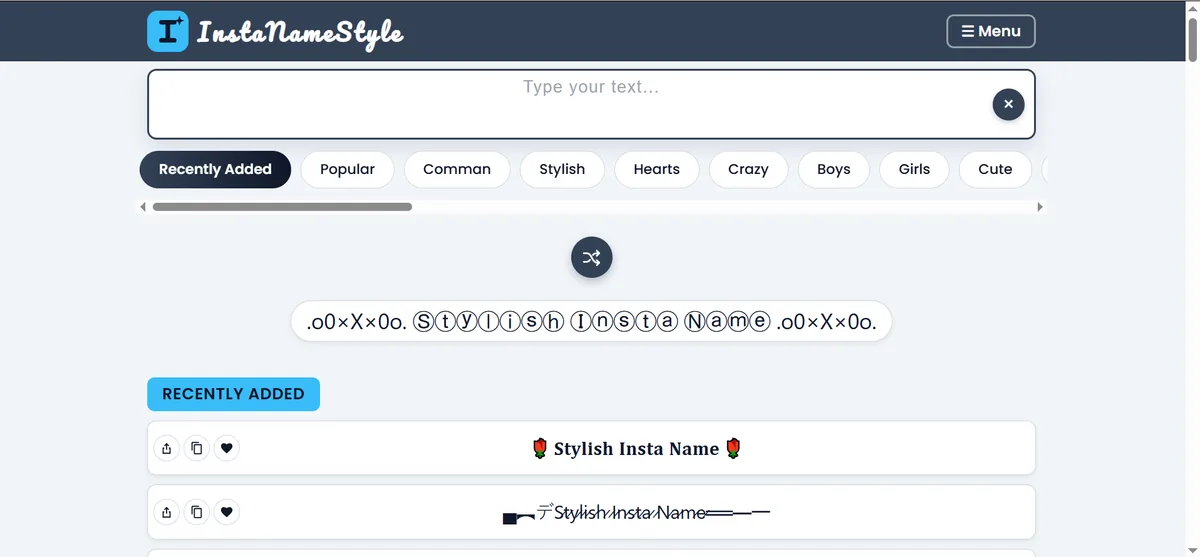
Step 1: Open the Blue Name Generator
Scroll to the top of this page. You will see the text box that says "Type your text…", the category buttons, and the shuffle button that creates random ideas. The bubble styles are already listed below the box, so you can see designs before you type anything.
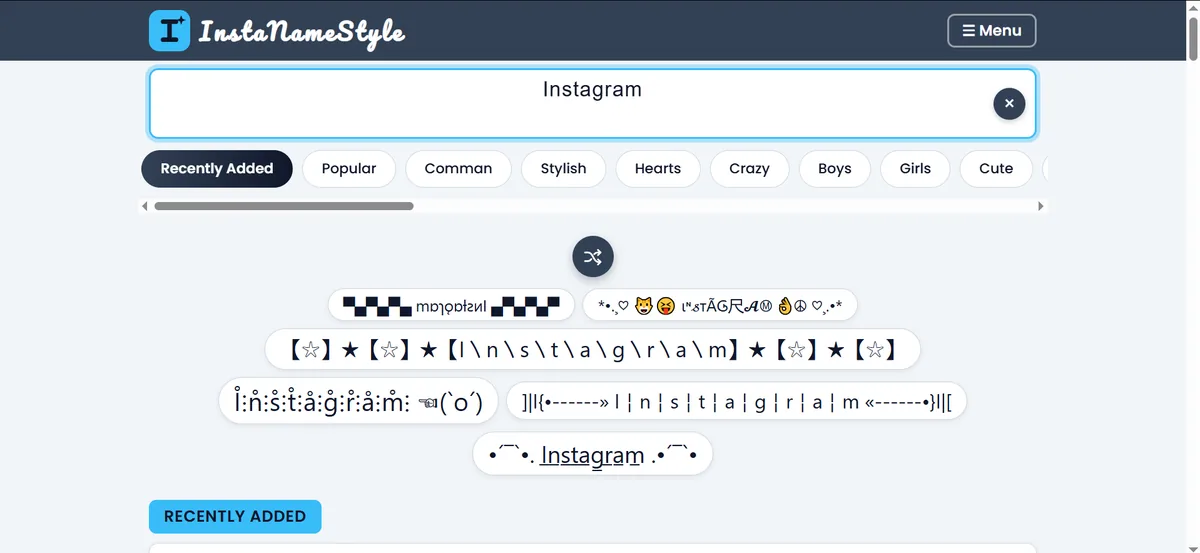
Step 2: Type Your Blue Name
Click the box and type the name you want, up to 40 characters. Every blue name style for Instagram on the page updates instantly, so you can see how your own name looks in each design. Use the round × button to clear the box and start again.
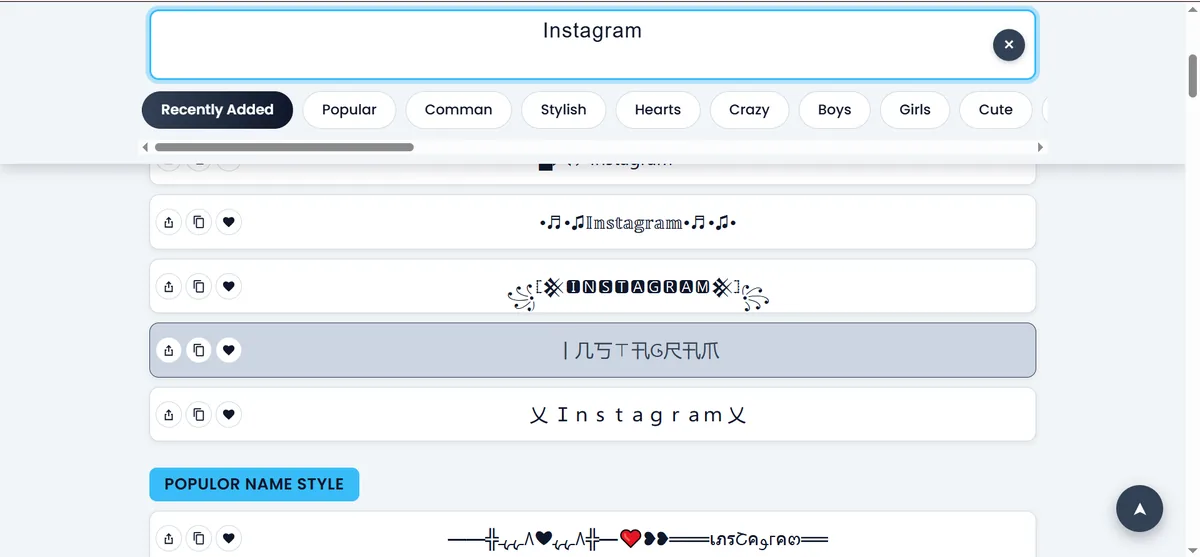
Step 3: Choose Your Instagram Blue Name Style
Scroll through the list and choose the design you like. Every row has three small buttons: share, copy and favourite. Tap the heart on styles you love so you can find them again. A rounded, bubbly design is the most popular Instagram blue name style because it pairs so well with blue emojis.
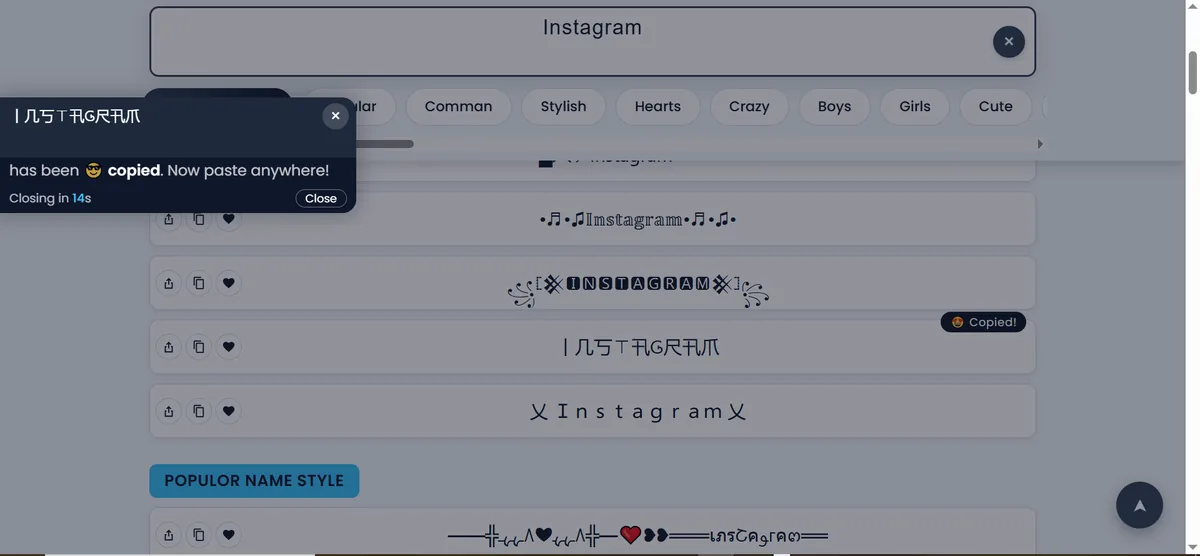
Step 4: Instagram Blue Name Copy and Paste
Tap any style, or press its copy button. A message confirms that your Instagram blue name copy is done, and you can paste it anywhere. Open Instagram, go to Edit Profile, long-press in the Name field, choose Paste, add a blue emoji if you like, and save.
Blue Name Style for Instagram: Ideas to Try
Because the letters cannot change colour, the blue comes from the decoration. These simple combinations work well with any bubble style you copy from this page.
Blue Heart Name Style
Place 💙 on both sides of your name for a soft, friendly look. It is the easiest blue name style for Instagram and suits personal, lifestyle and beauty profiles. For more heart designs, visit our heart decorated name styles.
Blue Circle and Diamond Name Style
Use 🔵 or 🔷 before your name for a cleaner, more modern feel. Circles match bubble letters because both are round, so this is a very natural Instagram blue name style. If you want a sharper look, try 🟦 instead.
Blue Name Style for Boys and Girls
Blue is popular with everyone. Many boys pair it with bold, minimal designs, so also check the name styles for boys and the attitude name styles. Girls often combine blue with soft shapes, so try the girls name styles and cute name styles.
Blue Name Style for Gaming and Social Apps
A blue name also looks good in game profiles, WhatsApp, Snapchat, TikTok and Free Fire, because those apps accept pasted text and emojis too. Just check that the game allows special characters in names before you save.
Where Can You Use Your Blue Name Style?
A style you copy from this blue name generator works in most places that accept normal text:
- Instagram Name field: the display name shown under your profile picture.
- Instagram bio: a stylish heading or highlighted words.
- Captions and comments: to make a word or short phrase stand out.
- Story text and highlights: for titles and labels.
- Other apps: WhatsApp, Facebook, TikTok, Snapchat and game profiles.
Important: your Instagram username (the @handle) only accepts letters, numbers, periods and underscores. Use your blue name style in the Name field and bio, and keep a simple username.
Tips for a Better Instagram Blue Name
- Keep it readable. If you have to look twice to understand the name, choose a simpler style.
- Use one or two blue emojis. A single 💙 beside your name looks cleaner than five.
- Match your theme. Soft bubbles suit lifestyle pages, while minimal designs suit gaming and business accounts.
- Stay consistent. Use the same style in your name, bio and highlights.
- Preview on your phone. Some symbols look different on different devices, so paste the name into a note first.
- Keep your real name searchable. Keep your plain name or brand in your username so people can still find you.
Why a Good Blue Name Matters on Instagram
Your name is one of the first things people notice on your profile, in comments and in search results. A clear blue name style for Instagram helps people recognise you faster and gives your page a finished look. It costs nothing, takes seconds to change, and you can switch to a different design whenever your taste changes.
That said, style should support your identity, not hide it. The best profiles combine a readable name, a short bio, a good profile photo and consistent posts. A blue name made with this blue name generator is a small finishing touch on top of those basics, so pick a design that you enjoy and that your followers can read easily.
Blue Name Style Not Showing Properly?
Because these styles use Unicode characters, a few older phones or apps may not have every symbol. If you see empty boxes or question marks, try these fixes:
- Choose a different bubble style. Simple circled letters work on almost every device.
- Update your phone's system software and the Instagram app.
- Use fewer rare symbols if your audience uses older phones.
- Paste the style into a message to yourself first to see how it looks.
Frequently Asked Questions About Blue Name Style
Is this blue name generator free?
Yes. You can generate, copy and paste as many styles as you like without paying or signing up.
How do I get a blue name style for Instagram?
Type your name in the box at the top, tap a bubble style so it is copied, paste it into your Instagram Name field, and add a blue emoji such as 💙 or 🔵 next to it.
Can the text itself be blue on Instagram?
No. Instagram does not support coloured text in names or bios. The blue look comes from blue emojis placed around your name.
How do I do an Instagram blue name copy and paste?
Tap the style you like, wait for the copied message, then open Edit Profile in Instagram, paste into the Name field and save.
Can I use a blue name in my Instagram username?
No. Usernames accept only letters, numbers, periods and underscores. Use your blue name in the display Name field and in your bio.
Will my Instagram blue name style work on iPhone and Android?
Most bubble styles and blue emojis work on both. A rare symbol may look slightly different, so check your name after pasting it.
Create Your Blue Name Style Now
You now know how the blue name generator works and how to build a blue name style for Instagram with bubble letters and blue emojis. Scroll back to the top, type your name, pick a style, copy it, and enjoy your new Instagram blue name. You can also explore more looks on our fancy name generator or go back to the Instagram name style home page.